High Lights- 3
Launch Templates and Tenancy
- A launch template specifies instance configuration (AMI ID, instance type, key pair, security groups, etc.).
- Default tenancy: shared.
- Tenancy behavior:
- Launch Template:
shared, VPC:dedicated→ dedicated tenancy - Launch Template:
dedicated, VPC:default→ dedicated tenancy
- Launch Template:
EC2 Tenancy Options
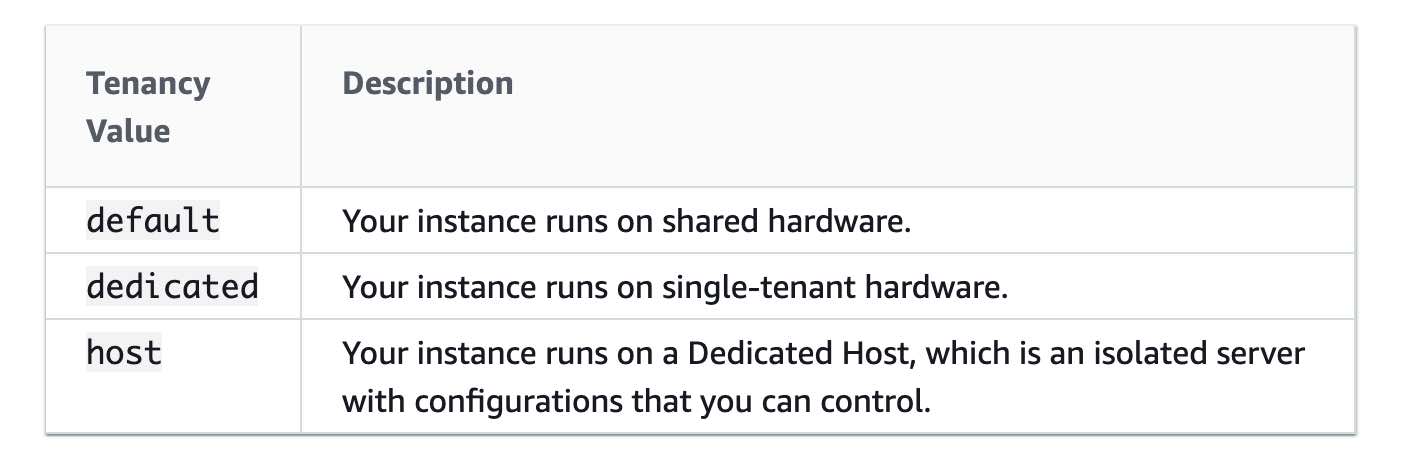
- By default, Amazon EC2 instances run on shared tenancy.
- Dedicated Instances:
- Run on hardware dedicated to one customer.
- Isolated across AWS accounts but can share hardware across instances within same account.
- Dedicated Hosts:
- Full control over instance placement.
- Visibility into physical server.
EC2 Spot Instances
- Spot Instance = unused EC2 at reduced price.
- Pricing is determined by long-term demand/supply in each AZ.
- Spot Instance request types:
- One-time
- Persistent
- Persistent requests reopen after interruption.
- Spot Fleets maintain target capacity by launching replacements.
- Canceling requests:
- May or may not terminate instance depending on config.
EC2 Recovery
- Recover impaired EC2 instance using CloudWatch alarms.
- Recovery applies to hardware failure or AWS-repairable issues.
- Preserves:
- Instance ID
- Private & Elastic IPs
- Metadata
- If instance is in a placement group, recovery remains within group.
- Note: Data in memory is lost.
🧠 Amazon EBS Volume Types — Memorize Like a Pro
✅ Provisioned IOPS SSD (io1) — Best for High IOPS Needs
- Backed by: SSD (Solid-State Drives)
- Use Case: Mission-critical, I/O-intensive workloads (e.g., production-grade databases)
- IOPS Performance:
- Up to 50 IOPS/GB
- Max 64,000 IOPS per volume
- Throughput: Up to 1,000 MB/s per volume
- Why Choose: Meets use-case needing 25,000 IOPS
❌ Incorrect Choices (Not suitable for high IOPS needs)
🟡 General Purpose SSD (gp2) — Balanced for General Use
- Backed by: SSD
- Use Case: Dev/Test, Boot volumes, Web servers
- Max IOPS: 16,000 IOPS (not sufficient for 25k+)
- Throughput: Moderate
- 🧠 Good all-rounder, but not built for intense workloads
🔵 Cold HDD (sc1) — For Archival Storage
- Backed by: HDD (Hard Disk Drive)
- Use Case: Infrequently accessed, cold datasets
- Max IOPS: 250 IOPS
- Throughput: Low
- 🧠 Think: Cheap, cold storage for backups
🟣 Throughput Optimized HDD (st1) — For Big, Streaming Data
- Backed by: HDD
- Use Case: Throughput-intensive workloads (e.g., MapReduce, Kafka, ETL, log processing)
- Max IOPS: 500 IOPS
- Throughput: High
- 🧠 Great for throughput, bad for high IOPS
🔑 Summary Table
| Volume Type | Backed By | Max IOPS | Best For |
|---|---|---|---|
| io1 | SSD | 64,000 | High IOPS DBs |
| gp2 | SSD | 16,000 | Dev/Test |
| st1 | HDD | 500 | Big data streaming |
| sc1 | HDD | 250 | Archival |
FSx for Lustre
- Use FSx for Lustre with Scratch File System for:
- Temporary storage
- Short-term data processing
- No replication, non-persistent if a file server fails.
- Up to 6× burst throughput of baseline 200 MBps/TiB.
Amazon Redshift
- Amazon Redshift is a fully managed petabyte-scale data warehouse in the cloud.
- Can be a target for data migration from other databases.
Route 53: Alias vs CNAME
- Amazon Route 53:
- No charge for alias queries, but charges for CNAME.
- Alias → AWS resources only (S3, CloudFront, same hosted zone).
- CNAME → Any DNS record.
- At zone apex (
covid19survey.com):- Cannot create CNAME
- Can create alias (e.g., point to
www.covid19survey.com)
Internet Gateway
- Internet Gateway:
- Acts as route target for internet-bound traffic.
- Performs network address translation (NAT) for public IPv4 instances.
Amazon SQS Polling
- Amazon SQS supports:
- Short polling: immediate response, may be empty.
- Long polling: waits for messages up to a timeout.
Long polling makes it inexpensive to retrieve messages, reducing cost and empty receives.
Amazon SQS FIFO Throughput
- By default, FIFO queues support up to 3,000 messages/sec with batching.
- Without batching: up to 300 messages/sec (send, receive, or delete operations).
- Batching enables meeting higher throughput requirements (up to 3,000 messages/sec).
AWS CloudFormation StackSets
- StackSet = CloudFormation + multi-account + multi-region.
- Uses one template from admin account.
- Provisions into target accounts/org units across regions.
Elastic Load Balancer: Connection Draining
- Elastic Load Balancing:
- Uses connection draining for:
- De-registering or unhealthy instances.
- Preserves existing connections until timeout (1–3600s, default: 300s).
- After timeout, force-closes remaining connections.
- Uses connection draining for:
DynamoDB Global Tables
- Active-active configuration in DynamoDB global tables:
- No failover – data is written regionally and replicated.
- More expensive than Aurora Global Database.
VPC Sharing
- VPC sharing via Resource Access Manager (RAM):
- Allows multiple accounts to deploy resources in a shared VPC.
- Owner shares subnets (not VPC itself) with org participants.
Elastic Fabric Adapter (EFA)
- Elastic Fabric Adapter (EFA):
- Enhances HPC and ML inter-instance communication.
- Adds OS-bypass interface to ENA features.
- User-space apps can access transport directly for performance.
Elastic Cache
- Amazon ElastiCache can be used to significantly improve latency and throughput for many read-heavy application workloads (such as social networking, gaming, media sharing, leaderboard, and Q&A portals) or compute-intensive workloads (such as a recommendation engine) by allowing you to store the objects that are often read in the cache.